The Grid: a whole market in one row of price cells
"Grid trading" means two different things, and it is worth separating them before looking at the screen. In crypto and forex, a grid is a strategy: a bot places buy and sell orders at fixed intervals above and below the price and keeps re-placing them. In polydesk clicktrader, the Grid is a view: every outcome of a market on one row of clickable price cells, so a trader can see and act on a whole market without opening one ladder per outcome. This page is about the second meaning. polydesk clicktrader has no bot and places no order you did not click.
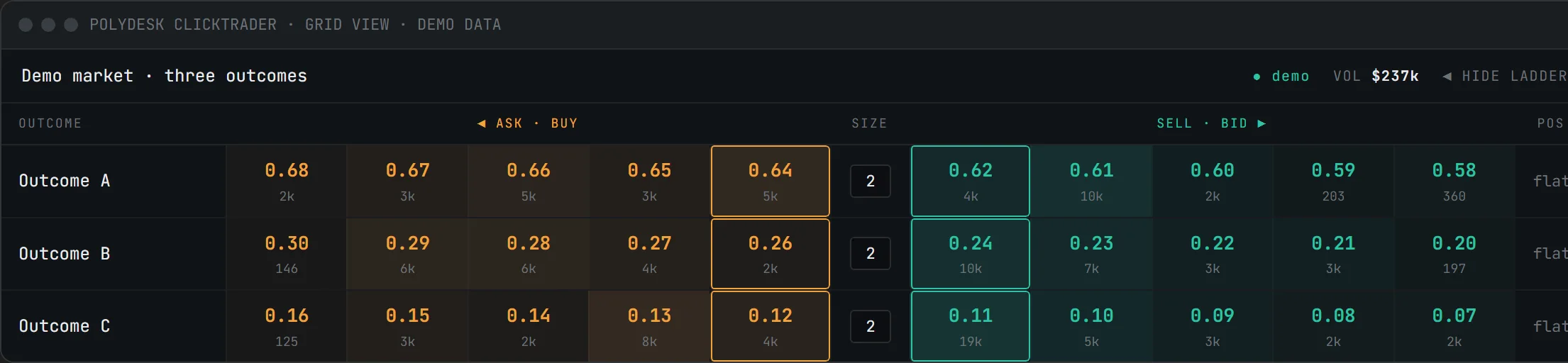
Anatomy of a Grid row
Each row is one outcome of the market. From left to right:
- Outcome name and, at the far right, your position in that outcome.
- Ask cells: the best sell levels, best ask on the inside. Each cell shows the price and the size resting there; the shading follows the size. How many levels per side is up to you — GRID DEPTH in the top bar takes four to twelve, eight by default.
- Size: the preset you are currently trading with, shown in the middle so it is never out of view.
- Bid cells: the best buy levels, best bid on the inside, same layout mirrored.
The header above the rows names the market, shows its volume and offers a toggle to open or hide the Ladder for a selected outcome. Because every outcome is one row, a market with three, five or ten outcomes is still one screen.
Orders from the Grid
The Grid takes orders in two clicks where the Ladder takes one: a click on a cell stages the bet in the PLACE BETS ticket, and the slot's confirm button puts it in the book. Click an ask cell to stage a buy at that price, click a bid cell to stage a sell at that price, an offer that rests in the book. The size comes from the active preset; the number keys 1 to 8 switch presets without leaving the Grid. Your working orders show in the positions panel underneath, where a click cancels a single order; CANCEL ALL in the WORKING ORDERS header — or Esc from anywhere — pulls every working order at once, and DISARMED blocks any new placement while you step away.
When the Grid, when the Ladder
The two views answer different questions about the same order book.
| Grid | Ladder | |
|---|---|---|
| Shows | Every outcome of one market, one row each | One outcome, every price level |
| Depth | Four to twelve levels per side | Full book, with minimap |
| Typical use | Overview of a multi-outcome market, quick entries and exits | Working a level, watching size build or fade |
| Own orders | Positions panel underneath | MINE column, in the ladder itself |
| Cash-out figure | Under POS in the row | HEDGE column, per level |
Most sessions use both: the Grid as the map, the Ladder as the magnifying glass. In the Free tier one ladder can be open at a time next to the Grid; Plus removes that cap (pricing).
What the Grid does not do
Because the word is overloaded, to be explicit: the Grid does not place orders at intervals, does not re-place filled orders, does not follow other wallets and does not suggest prices or sizes. Every order in polydesk clicktrader is one deliberate click by you, in paper mode or live. The software makes no decisions and promises no outcome. If you are looking for a description of the automated strategy, this is not it; if you are looking for a way to see a whole market and act on it in a click and a confirm, read on to the tutorial.
Frequently asked questions
Is polydesk clicktrader a grid trading bot?
What is the difference between the Grid and the Ladder?
How do I change the size in the Grid?
Is the Grid available in the Free tier?
Next: ladder trading, one outcome in depth · desktop terminal vs. browser tab · download polydesk clicktrader
What this page is and is not. polydesk clicktrader is a software tool, a local user interface. It provides no recommendations, signals or strategies and promises no economic outcome; all trading decisions and their results are your own. Trading on prediction markets can lead to the loss of all committed funds. In live mode, a software error can lead to unintended orders; practice in paper mode first, start with small sizes and use DISARM when you step away (terms, section 5).
Compatible with Polymarket. Not affiliated with Polymarket, neither operated nor endorsed by Polymarket. Polymarket is a trademark of its respective owner; itereon GmbH is independent and uses the name solely to describe compatibility. Whether you may use offers on third-party platforms at your location is for you to verify.